mirror of
https://github.com/socatlolmeow/drift.git
synced 2026-11-04 03:37:18 +00:00
 socatlolmeow
1d579f5311
- Windows support: drift now runs natively on Windows, using named pipes instead of Unix sockets.
- Song context menu: press G on any song for quick actions like play, queue, add to playlist, and song info
- Redesined command menu: the : prompt has a new, cleaner design
- Visualizer: a live audio visualizer now sits in the bottomleft corner
- Keybind hints: the most useful shortcuts are showen next to the volume control
89 lines
2.8 KiB
Markdown
89 lines
2.8 KiB
Markdown
<div align="center">
|
|
|
|
<h1>Drift</h1>
|
|
|
|
[](https://github.com/socatlolmeow/drift/stargazers)
|
|

|
|
|
|
### A music streaming client using Vim keybinds built in Rust.
|
|
|
|
Stream your favourite music from YouTube Music — all in one client, in your terminal.
|
|
|
|
</div>
|
|
|
|
---
|
|
|
|
<div align="center">
|
|
<img src="https://github.com/socatlolmeow/drift/blob/main/examples/showcase.gif?raw=true" alt="Drift showcase" />
|
|
</div>
|
|
|
|
---
|
|
|
|
## Features
|
|
|
|
- **YouTube Music streaming** - search and stream tracks directly from YouTube Music via `yt-dlp` and `mpv`
|
|
- **Vim-style keybinds** - navigate with `j`/`k`, enter commands with `:`, quit with `q`
|
|
- **Queue management** - add, remove, reorder, and clear tracks in your queue
|
|
- **Playlists** - save, load, append, and delete named playlists; import from YouTube/YouTube Music URLs
|
|
- **Shuffle & repeat** - toggle shuffle and cycle through off / repeat-all / repeat-one modes
|
|
- **Volume & seek control** - adjust volume and seek with configurable step sizes
|
|
- **Session restore** - automatically restores your queue and playback position on next launch
|
|
- **Artist search** - drill into an artist's discography from the results view
|
|
- **Command palette** - full `:command` interface (`:search`, `:play`, `:volume`, `:seek`, `:save`, `:load`, `:import`, and more)
|
|
- **Autoplay** - optionally keep playing through results when the queue ends
|
|
- **TOML config** - persistent config at `~/.config/drift/config.toml` (your platform's config directory); drift never rewrites it, so comments are preserved
|
|
|
|
---
|
|
|
|
## Installation
|
|
|
|
### Arch Linux (AUR)
|
|
|
|
```bash
|
|
yay -S driftmusic-git
|
|
```
|
|
|
|
Any AUR helper works (`paru -S driftmusic-git`), or build it by hand:
|
|
|
|
```bash
|
|
git clone https://aur.archlinux.org/driftmusic-git.git
|
|
cd driftmusic-git
|
|
makepkg -si
|
|
```
|
|
|
|
`mpv` and `yt-dlp` are installed automatically.
|
|
|
|
### Other distros
|
|
|
|
Install the dependencies:
|
|
|
|
- [mpv](https://mpv.io/) — audio playback
|
|
- [yt-dlp](https://github.com/yt-dlp/yt-dlp) — YouTube stream extraction
|
|
- [Rust](https://rustup.rs/) (build only)
|
|
|
|
Then build from source:
|
|
|
|
```bash
|
|
git clone https://github.com/socatlolmeow/drift.git
|
|
cd drift
|
|
cargo build --release
|
|
sudo cp target/release/drift /usr/local/bin/
|
|
```
|
|
|
|
Or install directly with cargo:
|
|
|
|
```bash
|
|
cargo install --path .
|
|
```
|
|
|
|
This installs `drift` to `~/.cargo/bin/`, which is on your `$PATH` if you installed Rust via [rustup](https://rustup.rs/).
|
|
|
|
## Star History
|
|
|
|
[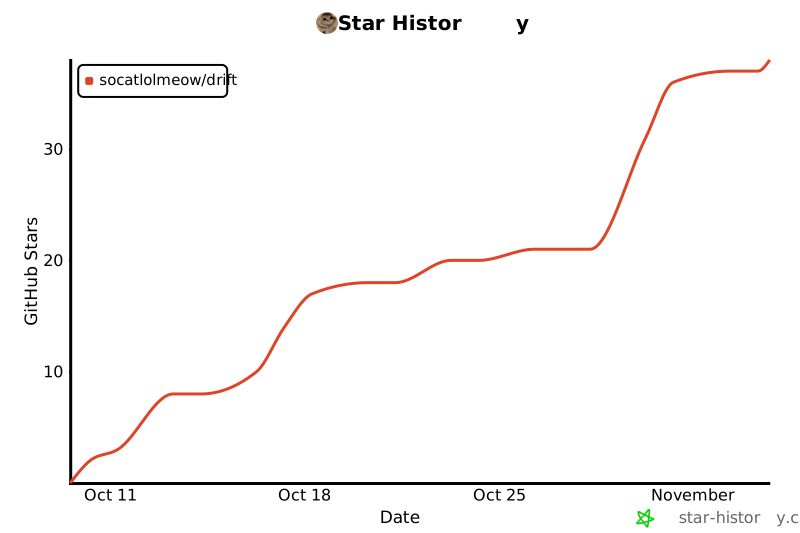](https://star-history.com/#socatlolmeow/drift)
|
|
|
|
---
|
|
|
|
## License
|
|
|
|
[Drift](https://github.com/socatlolmeow/drift) is FOSS, released under the [GNU General Public License version 3 or later](https://www.gnu.org/licenses/gpl-3.0.html).
|